What ships today
Features
Everything on this page is in the app now — version 0.3.0, free, in the public beta. Nothing here is a roadmap item.
A standards library that answers back
The Library is the on-ramp: no project, no state, just the tables you'd otherwise dig out of binders. It holds 125 NIHS standards — 99 current and 26 superseded, each superseded sheet marked with the standard that replaces it — in 370 tables, 6,151 table rows and 222 formulas, every cell read from the original standard sheets. Entries are organised by subsystem and searchable in plain words — “pivot”, “balance”, “screw” — and 48 figures are redrawn after the standards' own drawings, carrying the sheet's symbols and the values you pick.
In the library
- Pivot fits (NIHS 05-01 / 05-03) on the standard's own tolerance-zone chart — pick the grade straight from the chart
- Screws to NIHS 53-03, which replaces the 53/54/55/56 series: thread → head a × k → end type → standard length, tolerance classes as printed with limits from NIHS 04-01, the abbreviated designation and mounting holes from NIHS 58-10
- S-thread and M-thread dimensions and profiles (NIHS 06)
- Barrel drum, arbor and mainspring geometry (NIHS 10–12)
- Gear profiles, ratios and escape-wheel geometry (NIHS 20–26)
- Balance, staff, hairspring and collet (NIHS 34–35)
- Jewels (NIHS 41-11), plugs (NIHS 43-10) and end-stones
- Shock-absorber blocks (NIHS 44)
- Cases, crystals, crowns and hands (NIHS 60–66) — among them 60-50, 60-81 and 60-85, crystals 61-11/12/13, crowns and sealed tubes 63-31, hands 66-02 and 66-12
- Plates and bridges (NIHS 40-xx)
- Tolerances and fits: the ISO tolerance system (NIHS 04-01)
- Performance and testing, including the function check (NIHS 93-10)
- Vocabulary (NIHS 02-03 / 02-04)
- Lubrication (NIHS 99-02)
- Unit converter: length (mm, inch, ligne), frequency, torque and angle
- Watchmaking glossary
- “Export page data”: any Library page as a PDF
- Single-gear tool: preview one wheel and export its outline as DXF
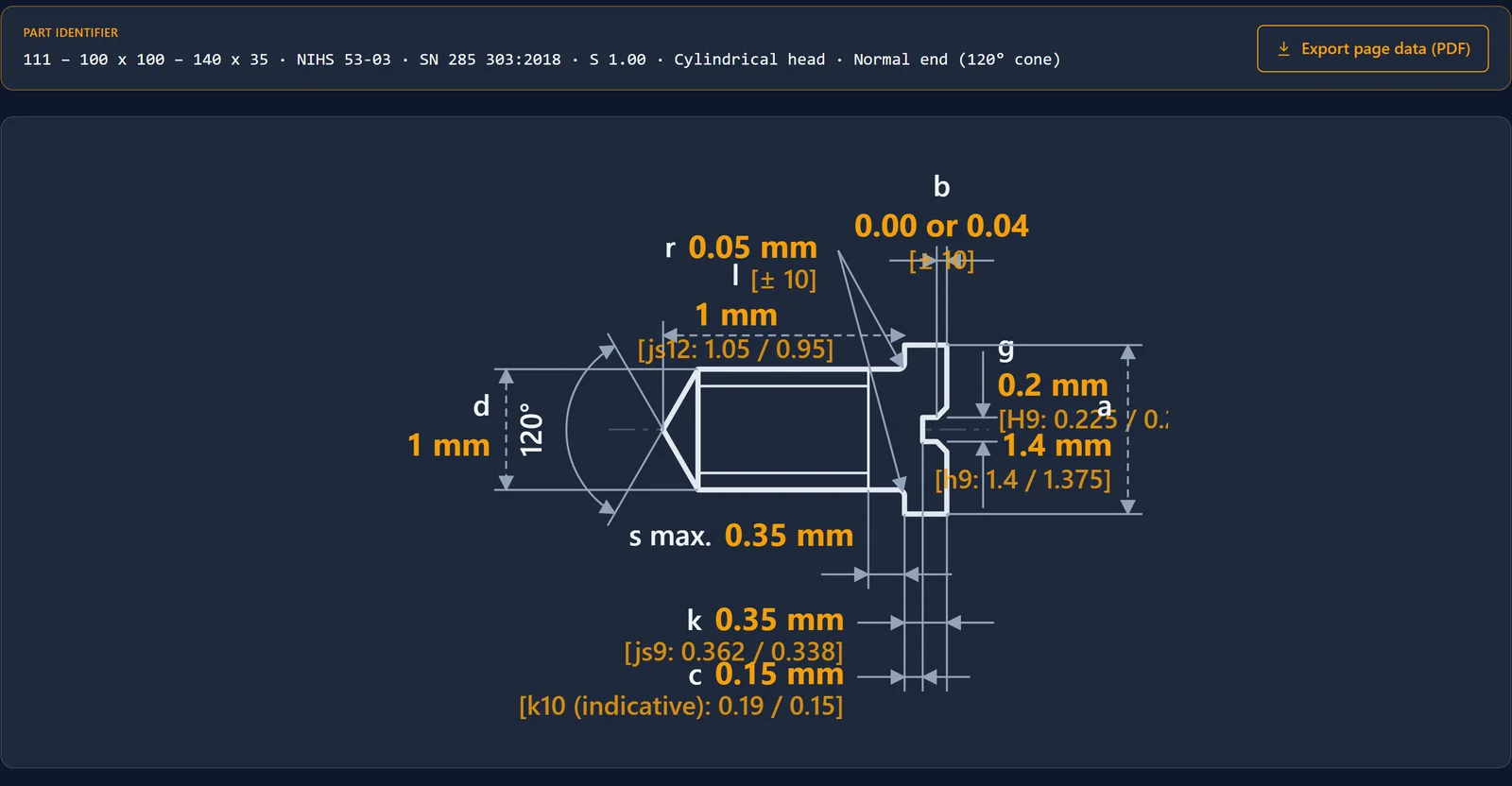
Redrawn after the standard's own figure — the sheet's symbols, with the values you picked and their tolerances on the drawing.
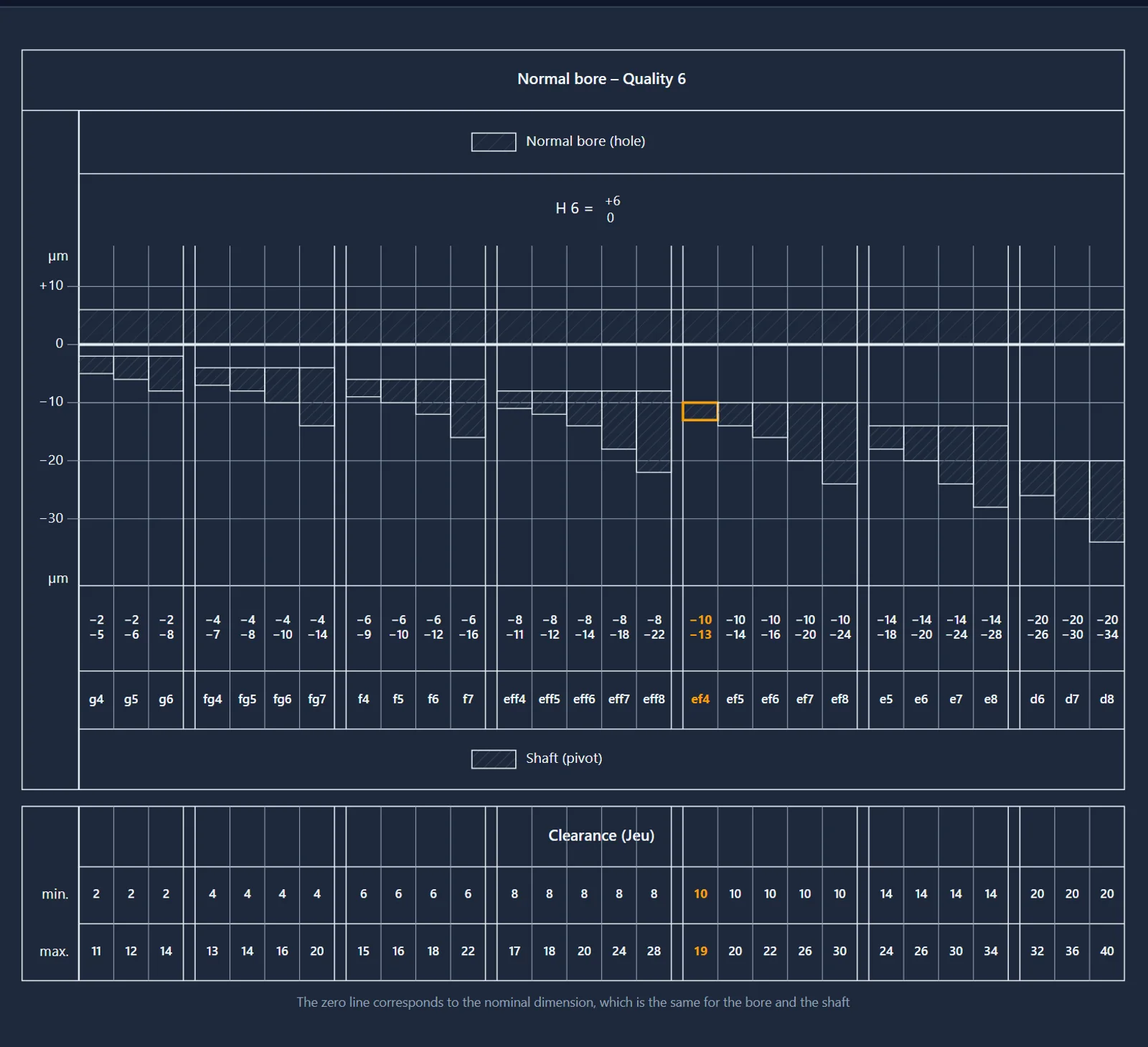
Pivot fits on the standard's own tolerance-zone chart (NIHS 05-01 / 05-03) — the grade is picked straight from the chart.
52 calculators that teach as they compute
The Calculator section covers the arithmetic of a mechanical movement end to end. Every calculator shares one discipline: inputs are visibly divided into decisions you make and defaults you can leave; computed results are marked as computed; the schematic redraws to scale from your numbers; a tap on a symbol in the figure highlights the matching field; and a collapsed “How to use” explains what the tool is for and when its assumptions stop holding.
The calculators cover
- Timing: beat rate, going train ratios, wheel speeds, clock trains
- Gearing: gear mesh and centre distance, tooth dimensions, cycloid and ogival profiles, gear efficiency, Willis planetary trains
- Energy: mainspring selection and developed turns, barrel torque, delivered energy, power reserve
- Oscillators: balance and hairspring pairing, balance inertia, pendulums, torsion oscillators, quartz comparison
- Escapements as first-class calculators: Swiss lever, cylinder, detent, Robin, verge — plus tourbillon and remontoir
- Mechanisms: motion work, keyless works, calendar and moonphase gearing, equation of time
- Materials and fits: density, strength, Brinell hardness, thermal expansion, ISO fits, pivot fits
- Measure: vernier reading, chord geometry, continued-fraction gear approximation, saros cycles
- “Export page data”: any calculator's inputs and results as a PDF
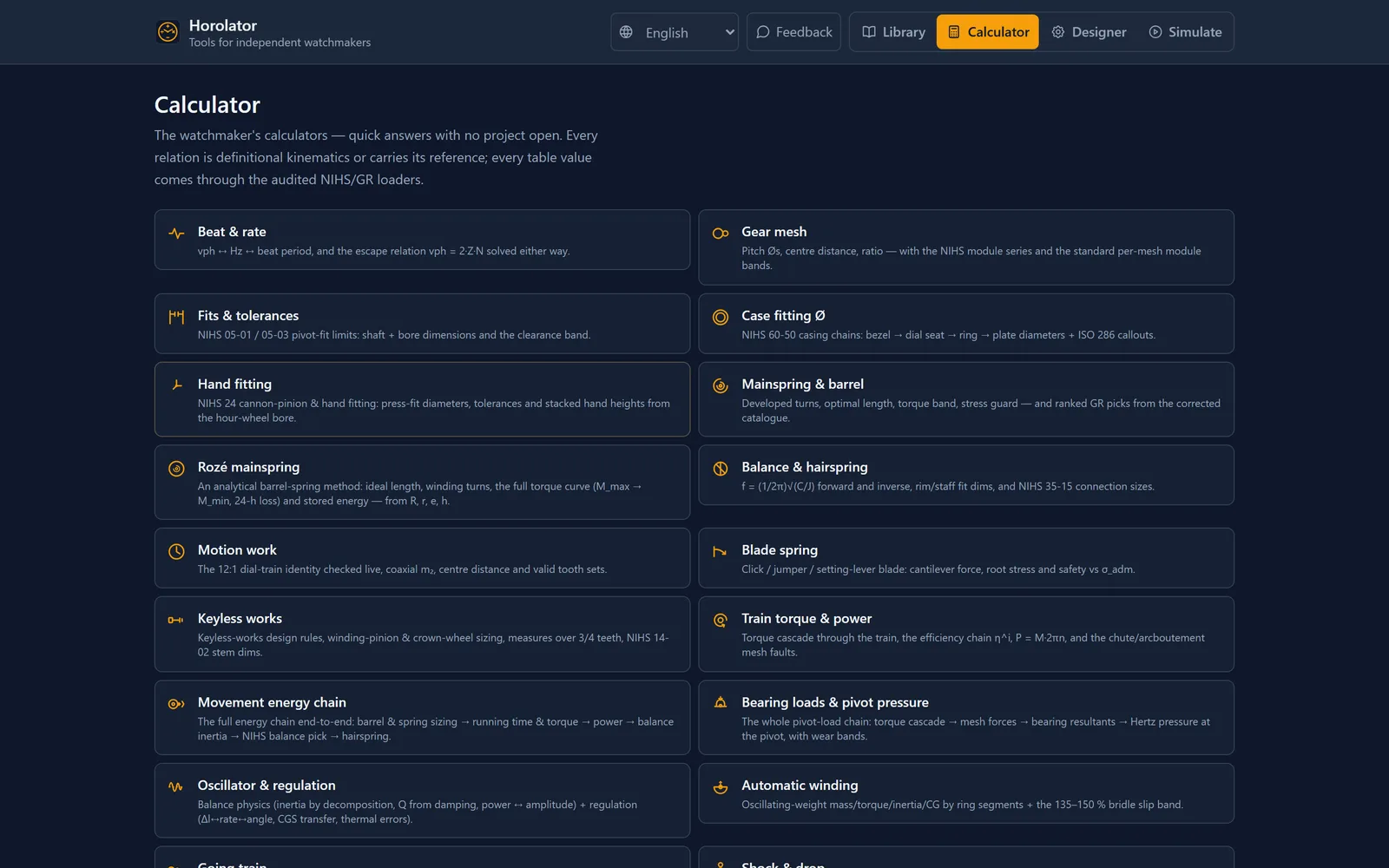
The full set. Each card opens into a to-scale schematic with its own “How to use”.
A drawing board that knows the rules
Designer is where the movement takes shape. Its gear generator constructs the Swiss ogival wheel-and-pinion form to NIHS 20-02 / 20-10 — the going-train tooth form, not a generic involute — and offers NIHS 20-25 corrected epicycloidal and ISO 53:1998 involute profiles beside it. Wheels are parts, not pictures: they mesh, they collide, they carry Z-heights you can inspect in a section view, and they export. When it's time to power the train, the barrel panel ranks real catalogue mainsprings — and you can add a second barrel, coupled in series, in parallel or independently, with the combined torque, turns and power reserve computed live. A power-reserve indicator can be generated on an epicyclic differential, sized for the movement's own turn counts.
On the board
- NIHS 20-02 / 20-10 ogival wheel + matched pinion generator
- NIHS 20-25 corrected epicycloidal and ISO 53:1998 involute profiles
- Auto-suggest a going train from target beat rate, escape teeth and caliber size
- Interactive gear chaining: route power, get integer tooth-count suggestions with honest error margins
- Catalogue mainspring picks with amplitude and reserve verdicts (same dynamics as Simulate)
- Second mainspring barrel — in series, in parallel or independent — with combined torque, turns and power reserve computed live
- Power-reserve indicator on an epicyclic differential, sized for the movement's own turn counts
- A twin-barrel demo in the project list: a 34 mm hand-wound movement with about 107 h of reserve
- Per-mesh module gradient check, barrel → escape
- Caliber fit against round, rectangular or freeform (sketched) outlines
- Wheel-to-wheel collision detection, Z-aware
- 2.5D section view: every part's height interval on its axis
- 2D sketcher with geometric constraints (points, meshes, edge clearances)
- Assembly tree with groups; goals dashboard with amplitude feasibility
- Calculators available inside Designer, next to the open project
- Edit history timeline that persists with the project
- Export per part or whole: DXF and SVG from true LINE / ARC entities
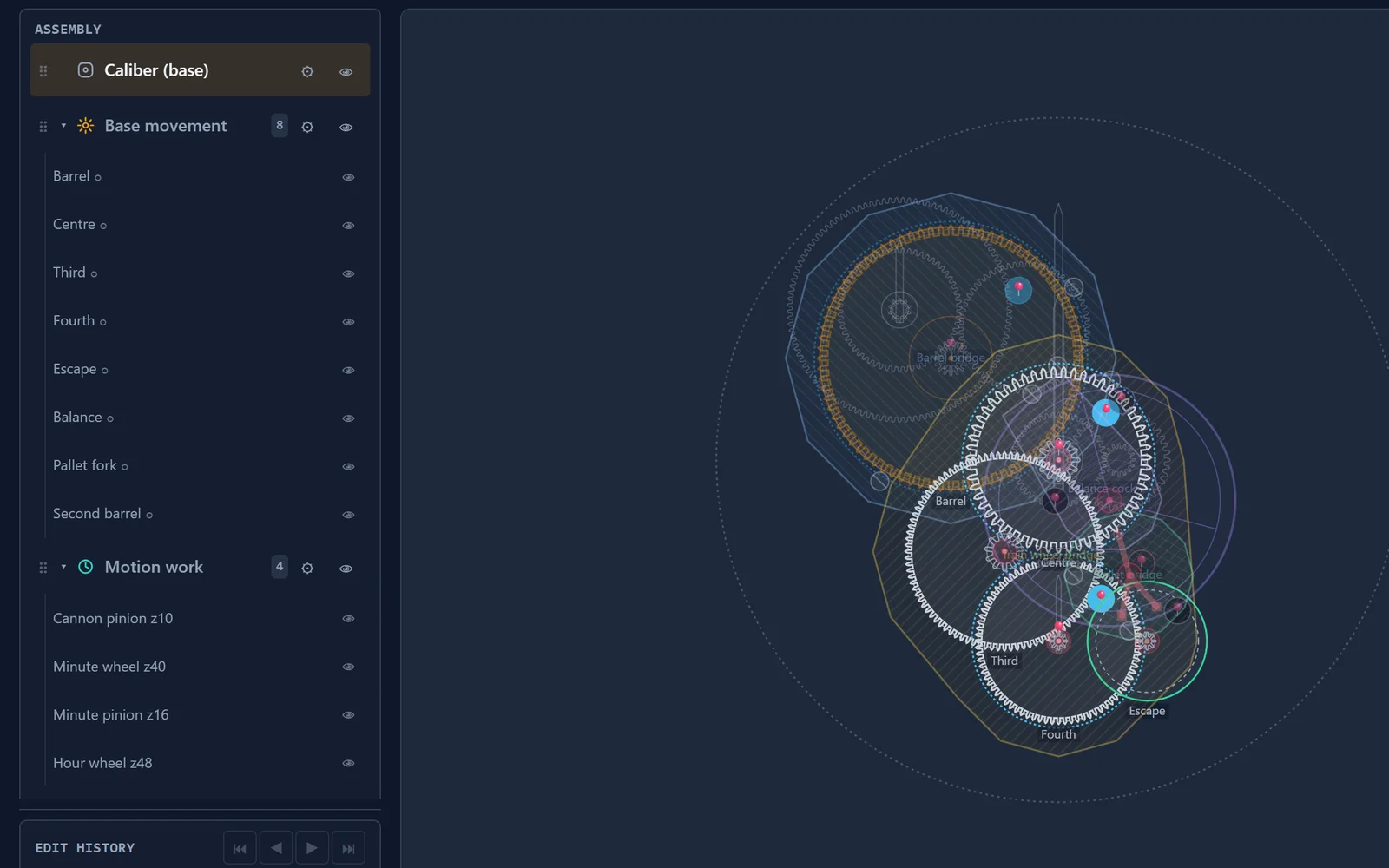
The twin-barrel demo — a 34 mm hand-wound movement with about 107 h of reserve — opens from the project list.
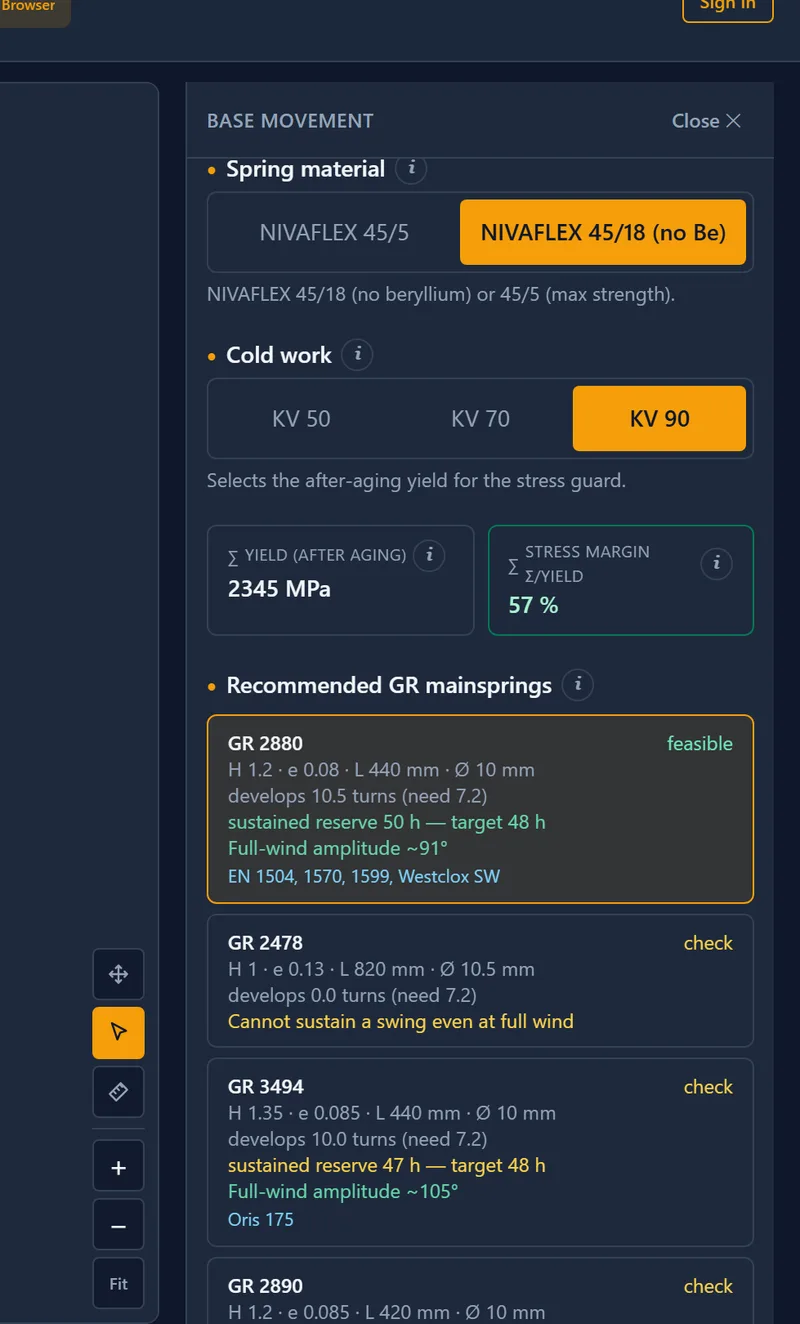
Mainspring picks with verdicts — developed turns, sustained reserve and full-wind amplitude for this movement, not just catalogue rows.
A test stand with real dynamics
Simulate never plays a canned motion. Rates derive from the design's own tooth counts; torque comes from the mainspring chosen in Designer, declining over the wind. The escapement is solved as dynamics — a Runge–Kutta integration through unlocking, percussion, sliding impulse and free swing, driven by the live escape torque — so amplitude follows the spring as it runs down, and the movement stops where the swing can no longer clear the unlocking window. Forces are not hidden in tables: switch on arrows, a heat map or power flow directly on the canvas, and tap any wheel to inspect it.
On the stand
- Going-train kinematics derived from geometry, escapement gating every tick
- Force chain from the chosen mainspring: barrel torque, per-arbor torque, tooth force per mesh, bearing load per arbor
- Live canvas layers: force arrows, heat map, power flow
- Wind slider and “wind one turn” — every force readout follows the wind state
- Runge–Kutta escapement dynamics: unlocking, percussion cascades, sliding impulse, free swing
- Amplitude follows the spring: full-wind amplitude, sustained reserve, honest stopping point
- Derived-rate readouts: target vs delivered beat rate, per-wheel speeds, daily rate
- Spring lab: draw a blade (pen, touch or mouse), analyse deflection and per-element stress with in-browser FEM
- Spring exports: STEP, DXF and SVG
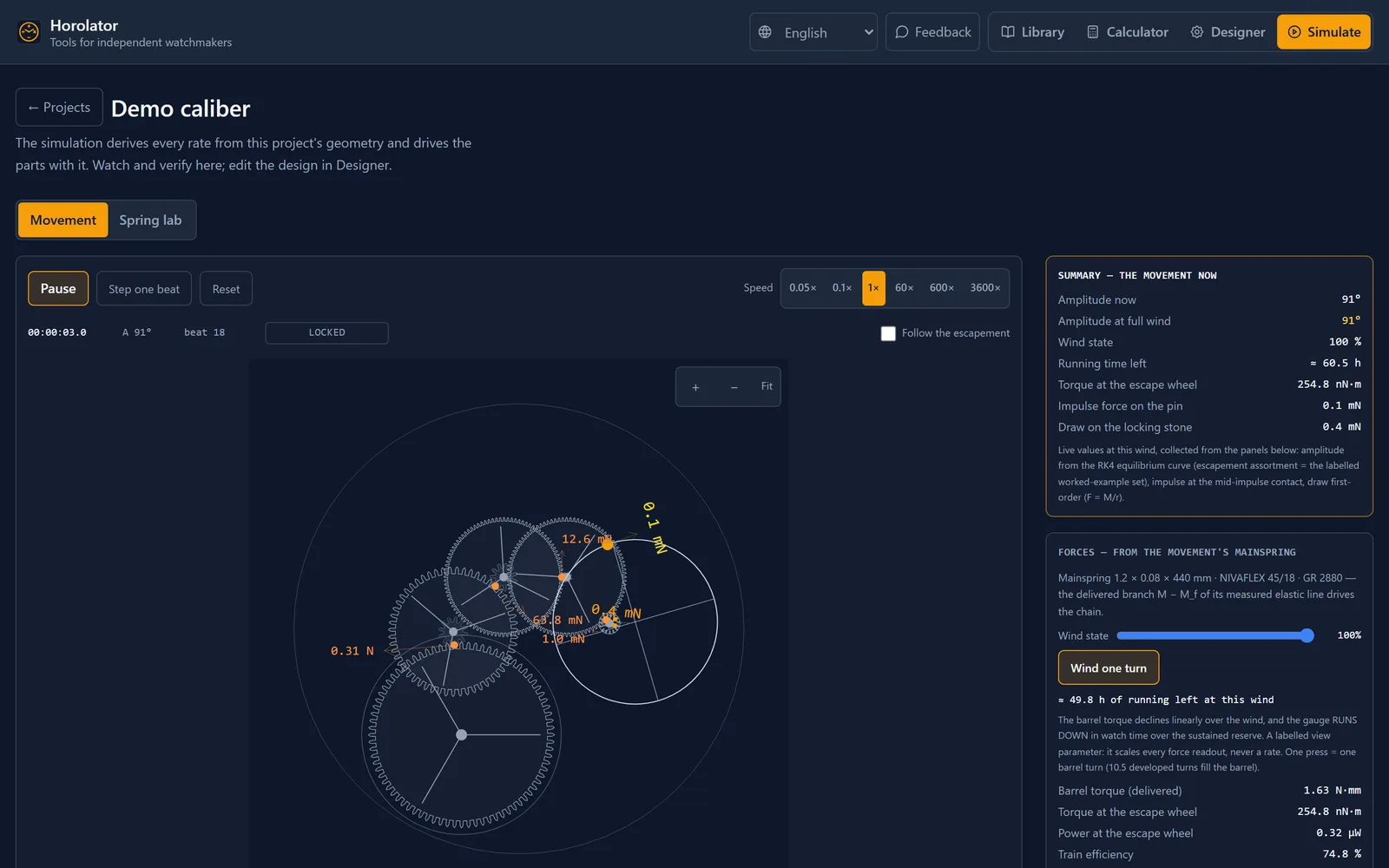
Running at 1× with the force-arrow layer on. The panels cite their sources — beat coupling, mesh ratios and per-mesh rendement per the NIHS gear-train standards.
And it fits in your pocket
Horolator is built phone-first and installs to a phone or the workshop computer, where it works offline. The same standards library, the same calculators, the same designer — at the bench, at the lathe, on the train home. The interface ships in 17 languages, with French now complete.
No account required. Free while in beta.